





A zero-day vulnerability is one of the most dangerous problems in
because attackers may be able to exploit a software weakness before developers have released an official fix. That small window between discovery and remediation can give attackers an opportunity to steal data, install malware, gain higher privileges, or compromise entire systems.
And zero-days aren’t just a theoretical threat. In August 2026, Microsoft disclosed patches for three zero-day vulnerabilities in its August security updates, including one Windows flaw that Microsoft said was being actively exploited. Recent incidents have also involved enterprise remote-access appliances, analytics software and other widely deployed systems.
So, what exactly is a zero-day vulnerability, how does a zero-day attack work, and what are the latest threats businesses and ordinary users should understand?
Let’s break it down.
What Is a Zero-Day Vulnerability?
A zero-day vulnerability is a security weakness in software, hardware, an operating system, application or service that is unknown to the vendor—or has not yet received an available security fix when attackers begin exploiting it.
The term “zero-day” refers to the fact that developers effectively have zero days of warning to prepare a patch before exploitation can occur.
For example:
- A security flaw exists in an application.
- An attacker discovers or obtains knowledge of the flaw.
- The attacker develops an exploit.
- The vulnerability is exploited before an effective patch is available.
- The vendor discovers the problem and works on a fix.
- A security update is released.
- Organizations and users install the update.
A vulnerability can therefore become a zero-day exploit situation when attackers are actively using the previously unknown or unpatched weakness.
Zero-Day Vulnerability vs Zero-Day Exploit
These terms are related but aren’t identical.
| Term | Meaning |
|---|---|
| Zero-day vulnerability | The underlying security weakness |
| Zero-day exploit | Code, technique or method used to exploit that weakness |
| Zero-day attack | An actual attack using the vulnerability |
| Patch | The vendor’s fix for the vulnerability |
Understanding this distinction helps when reading cybersecurity news.
Why Are Zero-Day Attacks So Dangerous?
The biggest problem is timing.
Traditional vulnerabilities may already have patches available. Security teams can scan their systems, identify affected software and deploy updates.
Zero-day attacks can happen before that defensive cycle is complete.
Depending on the vulnerability, attackers may be able to:
- Execute malicious code
- Gain administrator or SYSTEM privileges
- Steal credentials
- Access sensitive files
- Install malware
- Deploy ransomware
- Bypass security protections
- Move deeper into a corporate network
- Steal customer information
- Establish long-term persistence
The August 2026 Microsoft security updates illustrate the scale of the problem. Microsoft addressed roughly 400 vulnerabilities, including 42 classified as critical and three zero-days; one was already being exploited in attacks.
How Does a Zero-Day Attack Work?
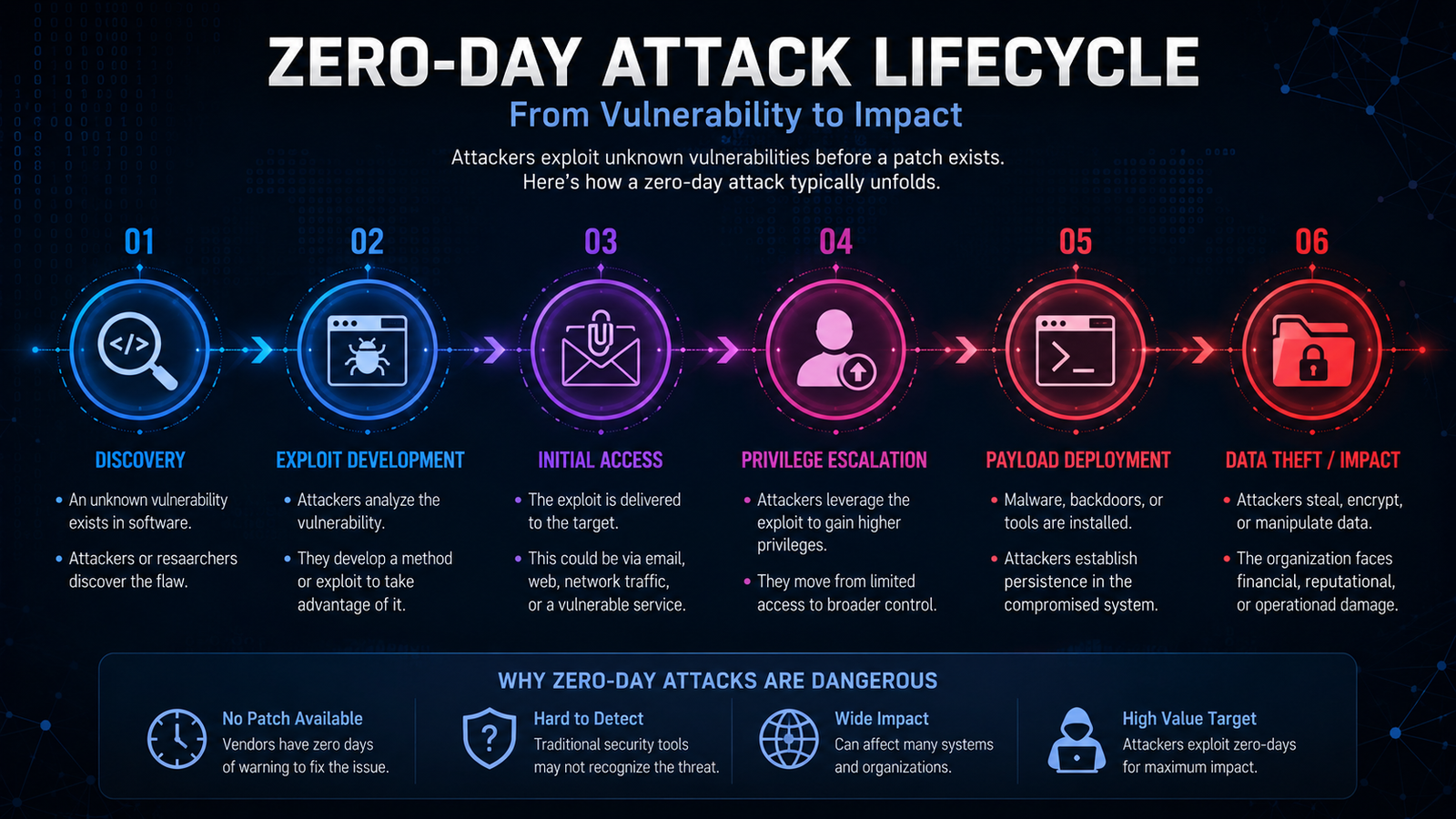
A typical zero-day attack can follow several stages.
1. Discovery
An attacker, researcher or security team identifies an unknown weakness.
The vulnerability could exist in anything from an operating-system component to a web application or network appliance.
2. Exploit Development
The attacker develops a technique capable of triggering the vulnerability.
This is where the vulnerability becomes particularly dangerous.
3. Initial Access
The attacker uses the exploit to enter or interact with a target system.
Depending on the flaw, this could happen through:
- A malicious document
- A website
- Network traffic
- A vulnerable application
- A public-facing server
- A compromised device
4. Privilege Escalation
If the initial access is limited, attackers may try to obtain higher privileges.
For example, a local privilege-escalation vulnerability could allow an attacker with limited access to obtain SYSTEM-level privileges.
Microsoft’s August 2026 patch cycle included CVE-2026-68820, a Windows Ancillary Function Driver for WinSock vulnerability that could allow an authenticated local attacker to elevate privileges to SYSTEM. Microsoft said it was being exploited, and Check Point linked exploitation to the Lazarus group.
5. Payload Deployment
Once attackers have sufficient access, they may deploy malware, steal information or establish persistence.
6. Data Theft or Disruption
The final objective can include:
- Data theft
- Espionage
- Financial fraud
- Ransomware
- Destructive attacks
- Long-term surveillance
Latest Zero-Day Security Threats in 2026
The zero-day landscape has been particularly active in 2026. Several recent cases demonstrate how different types of software can become targets.
1. Microsoft Windows Zero-Day Exploitation
Microsoft’s August 2026 Patch Tuesday addressed three zero-days.
The most significant was CVE-2026-68820, affecting the Windows Ancillary Function Driver for WinSock. Microsoft reported that the vulnerability was actively exploited. Check Point said attackers associated with Lazarus exploited it to deploy the FudModule kernel-mode rootkit.
This is important because it demonstrates how an apparently ordinary Windows component can become an entry point for sophisticated attacks.
What users should do
Windows users should:
- Install current security updates.
- Restart devices when required.
- Keep Microsoft Defender updated.
- Avoid running unknown software.
- Use standard accounts rather than administrator accounts for everyday activities where practical.
2. Microsoft Defender “ShieldBreak”
Another recent development involves a zero-day called ShieldBreak.
Security researcher Nightmare Eclipse disclosed the vulnerability after Microsoft’s August updates. According to BleepingComputer, the exploit could allow a local attacker with limited permissions to gain SYSTEM privileges on affected Windows systems. Microsoft said it was investigating and working on a security response.
This case is particularly interesting because it demonstrates that installing the latest patch does not automatically eliminate every emerging threat.
Security teams therefore need more than patch management alone.
They also need:
- Endpoint monitoring
- Privilege controls
- Threat detection
- Application control
- Incident-response procedures
3. SonicWall SMA1000 Zero-Days
Remote-access infrastructure is another major target.
In July 2026, SonicWall reported active exploitation of two vulnerabilities affecting its SMA1000 appliances: CVE-2026-15409 and CVE-2026-15410.
These devices provide remote access to internal applications and corporate networks, making them valuable targets. CERT-EU reported that the vulnerabilities were being exploited as zero-days and that CISA added both to its Known Exploited Vulnerabilities catalogue.
CISA later confirmed exploitation by ransomware groups.
Why this matters
A compromised remote-access appliance can potentially provide attackers with a pathway into an organization’s internal environment.
Businesses using network appliances should therefore treat vendor security advisories as high-priority operational alerts.
4. Metabase Zero-Day
Metabase, a popular business intelligence and analytics platform, was also targeted.
In August 2026, Metabase disclosed exploitation of an unknown vulnerability affecting versions 1.58 and later. The flaw was described as an unauthenticated SQL injection vulnerability that could ultimately provide an attacker with administrator access to a customer’s instance.
This case shows why organizations need to pay attention not only to operating systems but also to the applications running on top of them.
A vulnerable analytics platform can potentially expose sensitive business information even when the underlying server is properly maintained.
Are Zero-Day Attacks Only a Problem for Large Companies?

No.Large organizations are attractive targets because they hold enormous amounts of valuable data, but smaller businesses and individual users can also become victims.
Potential targets include:
- Windows PCs
- Smartphones
- Routers
- VPN appliances
- WordPress websites
- Cloud applications
- Business software
- Web browsers
- Email systems
- IoT devices
Attackers often prefer vulnerabilities that can be exploited at scale.
That means an ordinary user doesn’t necessarily need to be personally targeted.
AI Is Changing the Cybersecurity Landscape
Another important trend is the growing role of artificial intelligence in cybersecurity.
Security researchers are increasingly using AI-assisted systems to discover vulnerabilities and analyze software. At the same time, attackers can use AI to improve reconnaissance, phishing, malware development and automation.
F-Secure’s August 2026 threat report highlighted growing concerns around increasingly autonomous AI-driven cyber attacks and the potential for AI agents to perform more of the work traditionally handled by human attackers.
This creates a difficult situation:
AI can help defenders find vulnerabilities faster—but attackers can potentially use similar capabilities to scale attacks faster.
How to Protect Yourself From Zero-Day Vulnerabilities
There is no way to guarantee complete protection from a zero-day attack.
However, you can significantly reduce your exposure.
1. Keep Software Updated
This is the most important basic defense.
Enable automatic updates where practical for:
- Windows
- Android
- iOS
- Browsers
- WordPress
- Plugins
- Routers
- Security software
- Business applications
Once a vendor releases a security patch, delaying installation can leave you exposed to an already-known vulnerability.
2. Use Multi-Factor Authentication
MFA won’t stop every exploit, but it can prevent attackers from using stolen passwords to access accounts.
Prioritize MFA for:
- Cloud storage
- Banking
- WordPress
- Social media
- Business systems
- Administrator accounts
3. Minimize Administrator Privileges
Don’t give every user administrator privileges.
If malware gains access to a standard account, limiting privileges can make it harder for the attacker to take complete control of the machine.
4. Use Endpoint Security
Modern endpoint security can detect suspicious behavior even when antivirus software doesn’t have a specific signature for a newly discovered exploit.
For organizations, endpoint detection and response (EDR) can provide substantially greater visibility.
5. Back Up Important Data
Backups don’t prevent zero-day exploitation, but they can reduce the consequences.
Maintain backups of important:
- Documents
- Databases
- Website files
- Customer information
- Business records
For critical data, maintain an offline or otherwise isolated backup.
6. Monitor Security Advisories
Businesses should monitor advisories from:
- Software vendors
- CISA
- CERT organizations
- Security researchers
- Managed security providers
CISA’s Known Exploited Vulnerabilities catalogue is particularly useful because it focuses on vulnerabilities that have evidence of exploitation.
What Should Businesses Do During a Zero-Day Emergency?
When a serious zero-day is announced, organizations shouldn’t simply wait for the next IT maintenance window.
A better response is:
Step 1: Identify exposure
Determine whether the organization uses the affected product or version.
Step 2: Check the vendor advisory
Look for:
- Affected versions
- Available patches
- Workarounds
- Indicators of compromise
- Detection guidance
Step 3: Apply mitigation
If no patch exists, implement the vendor’s recommended workaround.
Step 4: Investigate possible compromise
Look for unusual:
- Login activity
- Processes
- Network connections
- File modifications
- Administrator accounts
- Authentication events
Step 5: Patch as soon as possible
Once a verified fix becomes available, deploy it according to the organization’s emergency change process.
Step 6: Rotate credentials when necessary
If there is evidence that credentials or authentication tokens may have been exposed, reset them and invalidate existing sessions where appropriate.
Zero-Day vs Known Vulnerability
A simple comparison makes the difference easier to understand.
| Feature | Zero-Day | Known Vulnerability |
|---|---|---|
| Vendor awareness | May be unknown or newly disclosed | Known |
| Patch available | Often unavailable initially | Usually available |
| Exploitation risk | Potentially very high | Depends on severity and exposure |
| Defender preparation | Limited | More time to prepare |
| Patching | Emergency priority | Standard vulnerability-management process |
| Detection | Often difficult initially | Security tools may already have detections |
The key lesson is that a vulnerability doesn’t remain a zero-day forever. Once the vendor knows about it and a fix or mitigation becomes available, the defensive situation changes.
The Biggest Lesson From Recent Zero-Day Attacks
Recent incidents show that zero-days aren’t limited to one particular technology.
We’ve seen exploitation involving:
- Windows components
- Security software
- Remote-access appliances
- Business intelligence platforms
- Enterprise infrastructure
And that makes one thing clear:
Cybersecurity cannot depend on a single defense.
Patching, MFA, endpoint security, network segmentation, least privilege, backups and continuous monitoring all work together to reduce the impact of an attack.
Frequently Asked Questions
What is a zero-day vulnerability?
A zero-day vulnerability is a security weakness that is unknown to the vendor or has not yet received an effective fix when attackers can exploit it. It can give attackers an opportunity to compromise systems before normal patching defenses are available.
Why is it called zero-day?
The term refers to having effectively zero days of warning to defend against exploitation before a fix is available.
What is a zero-day exploit?
A zero-day exploit is the technique or code used to take advantage of a zero-day vulnerability.
Can antivirus stop zero-day attacks?
Sometimes. Modern security products can detect suspicious behavior rather than relying only on known malware signatures. However, no security product can guarantee protection against every zero-day attack.
Are zero-day vulnerabilities dangerous for Windows users?
They can be. Windows is widely deployed, so vulnerabilities affecting core Windows components can have a large potential impact. Microsoft’s August 2026 security updates included an actively exploited Windows zero-day.
How can I protect my computer from zero-day attacks?
Keep your operating system and applications updated, use MFA, avoid suspicious files and links, use reputable endpoint protection, maintain backups and use a standard account when possible.
What should a company do when a zero-day is discovered?
The company should determine whether affected systems are exposed, review the vendor’s advisory, apply available mitigations or patches, investigate signs of compromise and monitor affected systems closely.
Where can I find information about actively exploited vulnerabilities?
CISA’s Known Exploited Vulnerabilities catalogue is one important source for tracking vulnerabilities with evidence of exploitation. Organizations should also monitor their vendors’ official security advisories.
EXTERNAL SOURCE SUGGESTIONS
For this article, the strongest source types are official security organizations and vendors:
- CISA — Known Exploited Vulnerabilities and cybersecurity guidance.
- Microsoft Security Response Center — Windows vulnerability advisories.
- SonicWall PSIRT — SMA1000 security advisories.
- Metabase Security — Product vulnerability announcements.
- CERT-EU — European cybersecurity threat intelligence.
Recent reporting from BleepingComputer, CERT-EU and security research organizations was also used to verify the current 2026 threat landscape.
#Cybersecurity #ZeroDay #ZeroDayVulnerability #CyberAttack #InfoSec #WindowsSecurity #CyberThreats #DataSecurity #Ransomware #AJTechy